Integration
Local automation API
When your invoice data already exists somewhere else, it should not be retyped. The local automation API exposes outgoing documents, incoming receipts, payments and master data as an HTTP interface, on this computer only, and only while Billance is running.
At a glance
- Address
- http://127.0.0.1:47115/api/integration/v1
- Access
- Programs on the same computer only
- Auth
- Bearer token
- Contract
- OpenAPI 3.1
What the API is and what it is not
The automation API is a local HTTP server that Billance starts on your computer. It manages outgoing documents and incoming receipts, payments and master data, and it can validate or read e-invoices. It is not a cloud endpoint and not a ready-made connector for a particular ERP vendor but a technical interface for your own scripts, workflows and local business software.
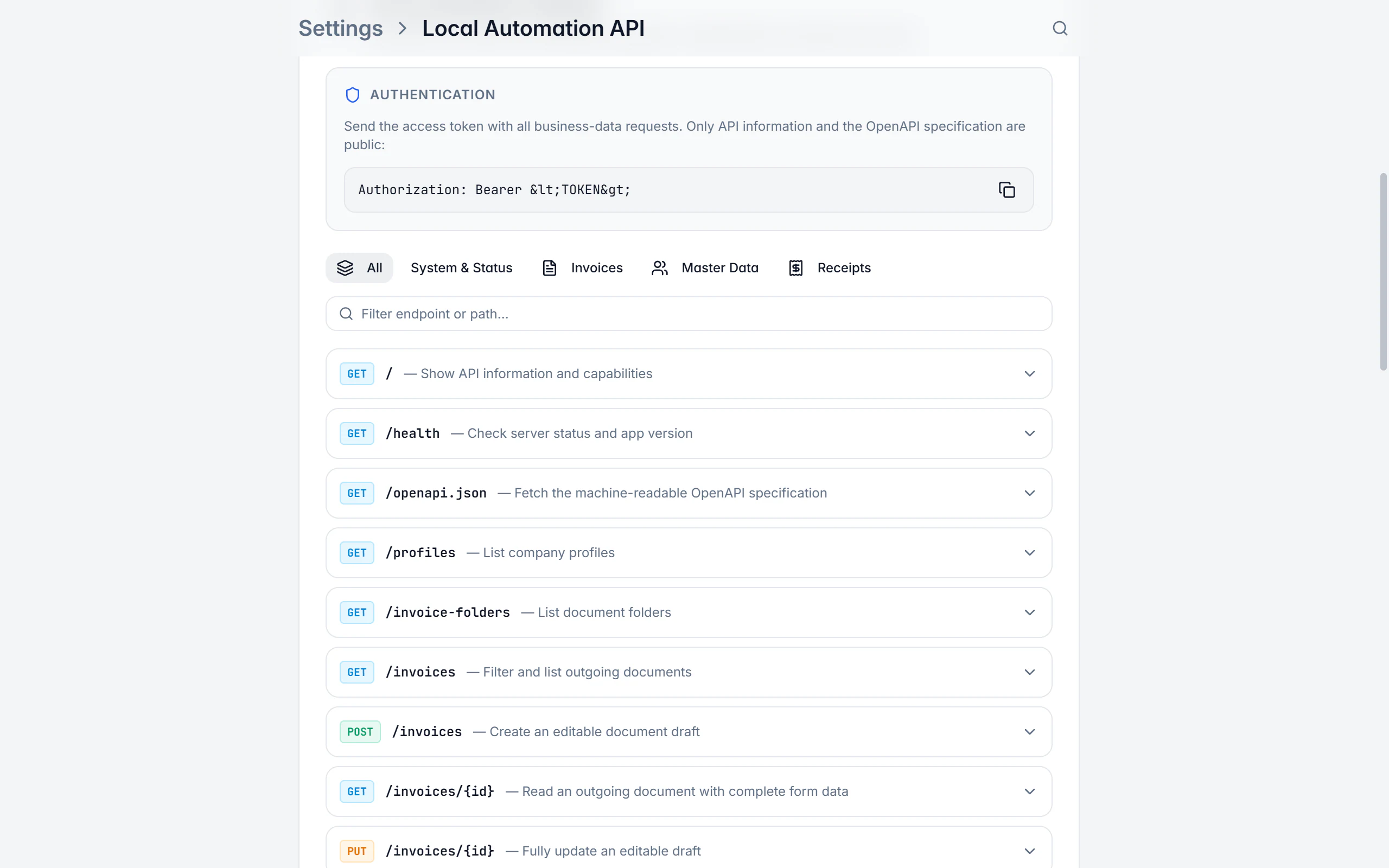
Access is deliberately narrow: the server listens on 127.0.0.1, so only programs on the same computer reach it. Devices on the LAN, cloud services and browser applications cannot access it directly. Browsers are intentionally given no CORS clearance. Every business request needs the bearer token Billance shows in the settings; without a token only the root path and the OpenAPI specification are reachable.
The API description ships with the app: the settings hold a searchable endpoint overview with parameters, example payloads and copyable cURL commands, and <BASE-URL>/openapi.json serves the OpenAPI 3.1 specification for tools and generated clients. Always use the specification of your installed version so your client matches the app’s actual contract.
Connected in five steps
Enable the API
Turn the local server on under Settings → Integrations.
Set the port
Keep the default port 47115 or pick a free port between 1024 and 65535 if another program occupies it.
Copy base URL and token
Both go into your automation tool; the token belongs in a secret store, never in source code, a repository or logs.
Test the connection
A call to
/healthwith the authorization header returns the status, API and app version and the available capabilities.Explore the endpoints
The endpoint overview in the settings and the OpenAPI specification show parameters, example payloads and cURL commands.
What the API covers
Create outgoing documents
POST /invoiceswithdocumentTypeand completeformData. The form model mirrors the app’s editor.All seven document types
invoice,offer,confirmation,delivery_note,credit_note,recurringandreminderare available.Generate and export
POST /invoices/{id}/generateuses the same templates, fonts, payment profiles and e-invoice rules as the interface; the export returns PDF, ZUGFeRD, XRechnung, UBL or JSON.Status changes with clear errors
finalizefor the first transition,statusfor the rest; disallowed changes return409with the stable codeinvalid_status_transition.Payments calculated for you
Payments go to
/invoices/{id}/payments; Billance derives paid amount, remaining balance, status and discount itself.Maintain master data
/recipientsand/productsoffer list, create, update and delete access; writes always apply to the active company profile.Receipts and attachments
/receiptsmanages supplier invoices; original files are uploaded as base64 (PDF, PNG, JPEG, WebP, HEIC, TIFF and XML up to 50 MB).Validate and read e-invoices
POST /import/validatechecks PDF or XML files,POST /import/einvoiceadditionally returns structured invoice data. Neither creates a document automatically.Errors under RFC 7807
Responses arrive as
application/problem+jsonwith a stablecodeyou can evaluate instead of parsing text.
Token, boundaries and error codes
The token grants access to your local Billance data. That is why the boundaries are drawn narrowly, and you should handle the token with the same care.
401 · unauthorized
- Meaning
- The token is missing or invalid.
403 · premium_required
- Meaning
- Premium access is not available.
404 · not_found
- Meaning
- The resource or the local original file is missing.
409 · profile_not_active, receipt_locked, invalid_status_transition
- Meaning
- A business conflict or a lock on finalized data.
413 / 415 / 422
- Meaning
- payload_too_large, unsupported_media_type or validation_failed: the request, file type or data is invalid.
429 · rate_limited
- Meaning
- More than 120 requests within one minute.
Never store the token in source code, repositories or logs. After renewing it, the old token becomes invalid immediately and every client has to be updated.
What makes an integration hold up
A handful of rules decide whether a connection still works after the second update.
Read before every PUT
PUT /invoices/{id}replaces the form data entirely. Read the current draft first and send it back completely so unknown or later added fields are preserved.Store IDs in the source system
That way your software finds a document again after a restart instead of creating it a second time.
Read first after a timeout
Check with GET whether the write already arrived before repeating it.
Handle conflicts deliberately
A
409is a business statement, such as a lock on finalized data, and not a reason to simply retry.Limit concurrency
After a
429, continue with backoff instead of sending at the same rate.Use only
formDataNew integrations use
formDataexclusively;datais only a deprecated compatibility alias.
For LAN, cloud or mobile access you need your own secured intermediary layer with authentication, encryption, permissions and a data protection concept.
Where the API runs
The automation API is a feature of the desktop application, because it needs a local server on your machine.
In the desktop app
You find it under Settings → Integrations → Local automation API. There you switch the server on, choose the port, copy base URL and token, run the connection test and search the endpoint overview with its example payloads and cURL commands.
In the mobile app
The mobile app has no local server: a phone is not a permanently reachable workstation, and an open port would be the wrong tool there. The data created through the API reaches your mobile devices through encrypted cloud synchronisation.
Free or Premium
On the free plan
The local automation API is not part of the free plan.
With Billance Premium
With Premium you get the local server, every endpoint and the OpenAPI specification, with no per-call cost.
Without Premium access the API answers with 403 premium_required rather than quietly doing nothing.
Frequently asked questions about the automation API
No. The server runs exclusively on your computer and listens on 127.0.0.1. Devices on the network, cloud services and browser applications cannot access it directly; browsers are intentionally given no CORS clearance.
Read on
Step by step in the help centre
The help articles walk through the same workflow as step-by-step instructions, including all fields, buttons and special cases.
Ready for e‑invoices?
Start with Billance and create your first e-invoices in just a few minutes.