Document management
Manage invoices and documents
Invoices, quotes, order confirmations, delivery notes, credit notes, recurring series and reminders live in one overview. Document type, status, search and filters narrow it down, folders sort it, the archive clears it up, and the trash catches mistakes.
At a glance
- Document types
- Seven, each with its own states
- Organisation
- Folders, archive, trash
- Views
- List and tiles
- Available on
- Desktop app and mobile app
One overview for every outgoing document
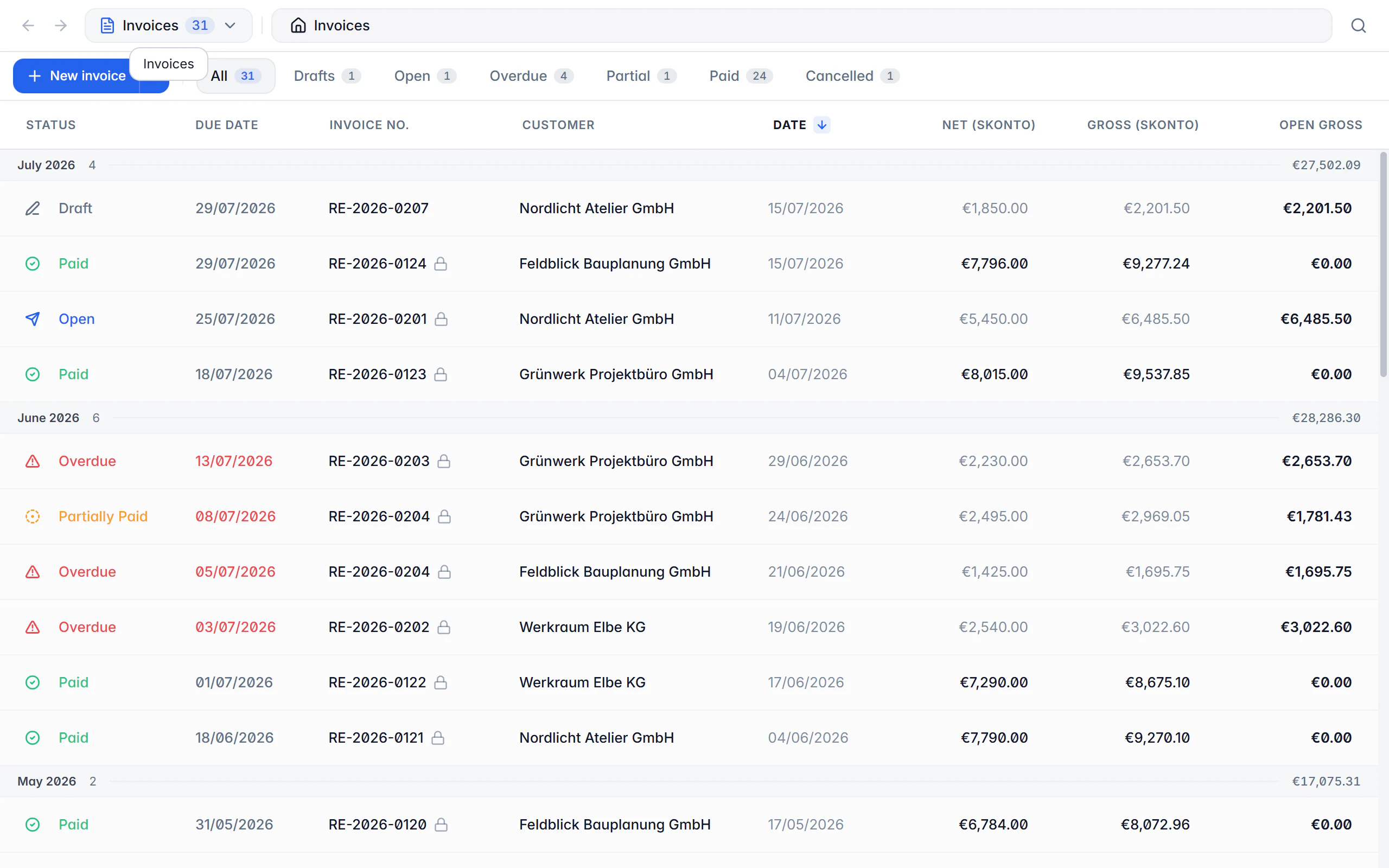
The document manager is where everything you have written comes together. The document type picker switches between invoices, quotes, order confirmations, delivery notes, credit notes and cancellations, recurring invoices and reminders. Each type brings the status filters it actually has — an invoice knows open and paid, a quote accepted and expired, a delivery note delivered.
Order is created on three levels. Folders group documents freely by customer, project or year and can be nested; a breadcrumb trail shows where you are. The archive takes in finished cases that should be kept but no longer be in the way. The trash holds deleted items with their deletion date until you remove them for good.
Folders change nothing about the document itself: number, status and content stay the same wherever it sits. And because organisation is not a backup, a neatly sorted set of documents still needs a regular backup.
Working with the overview
Choose the document type
The type picker decides which documents and which status filters the list shows — including the count per type.
Filter and search
Status, period, recipient and full-text search narrow the list; columns can be sorted and the view switched between list and tiles.
Run an action
Edit, open the file, finalize, change status, record a payment, validate, archive, delete or create a matching follow-up document.
Sort it
Move documents individually or as a multi-selection into folders, and archive finished cases.
Restore
From the archive a document returns to the overview; from the trash documents and entire folders can be brought back.
What the document manager does
Status per document type
Every type brings its own states instead of forcing everything into an invoice scheme — from an open quote to an escalated reminder.
Nested folders
Folders by customer, project or year, nested as deep as you like, with breadcrumbs and back/forward arrows.
Archive instead of delete
Finished cases disappear from the overview but stay fully intact and can be restored at any time.
Trash with deletion date
Deleted documents, receipts and folders can be restored individually or together; only “delete permanently” removes them for good.
Multi-selection and bulk actions
With Ctrl/Cmd, Shift and Ctrl/Cmd + A you select many entries and handle them in one go.
Record payments right there
A payment can be recorded from the list; payment status and outstanding amount are recalculated immediately.
Steer recurring series
Recurring invoices can be activated, paused or run immediately, and the overview shows the next and last run.
Create follow-up documents
Credit note, cancellation, reminder or delivery note grow straight out of the list — with the data carried over and the reference set.
Validate generated files
An e-invoice that has already been produced can be validated directly from the overview.
On desktop and in the app
Both applications show the same set of documents; the handling follows what is natural on each device.
In the desktop app
Breadcrumbs and arrows navigate the folder history. You switch between list and tiles, sort table columns and open the context menu with a right click. Multi-selection with Ctrl/Cmd and Shift, drag and drop moves documents and folders, and an opened document appears as its own tab.
In the mobile app
In the app you switch area with the document type picker; search and filters live in the header and the filter sheet. A tap opens the detail view, a swipe or the action menu shows the available actions. Folders and trash open as their own pages.
Free or Premium
On the free plan
The overview, search, filters, status and the trash are available on the free plan, and existing folders stay usable.
With Billance Premium
Premium unlocks creating new folders — together with the advanced document types that only appear in the overview once you can create them.
After a downgrade, existing folders and all documents are kept.
Frequently asked questions about document management
The archive takes in finished cases you want to keep — they only disappear from the normal overview. The trash collects deleted items with their deletion date until you remove them for good. Both can be undone.
Read on
Step by step in the help centre
The help articles walk through the same workflow as an instruction – every field, every button, every special case.
Ready for e‑invoices?
Start with Billance and create your first e-invoices in just a few minutes.